

I’ve sunk hundreds of hours into fine-tuning setups across rigs and styles, pulling together the real deal on what counts in Valorant. Ditch the forum rabbit holes and video binges – this lays out every key tweak.
Essential Display and Video Settings for Valorant
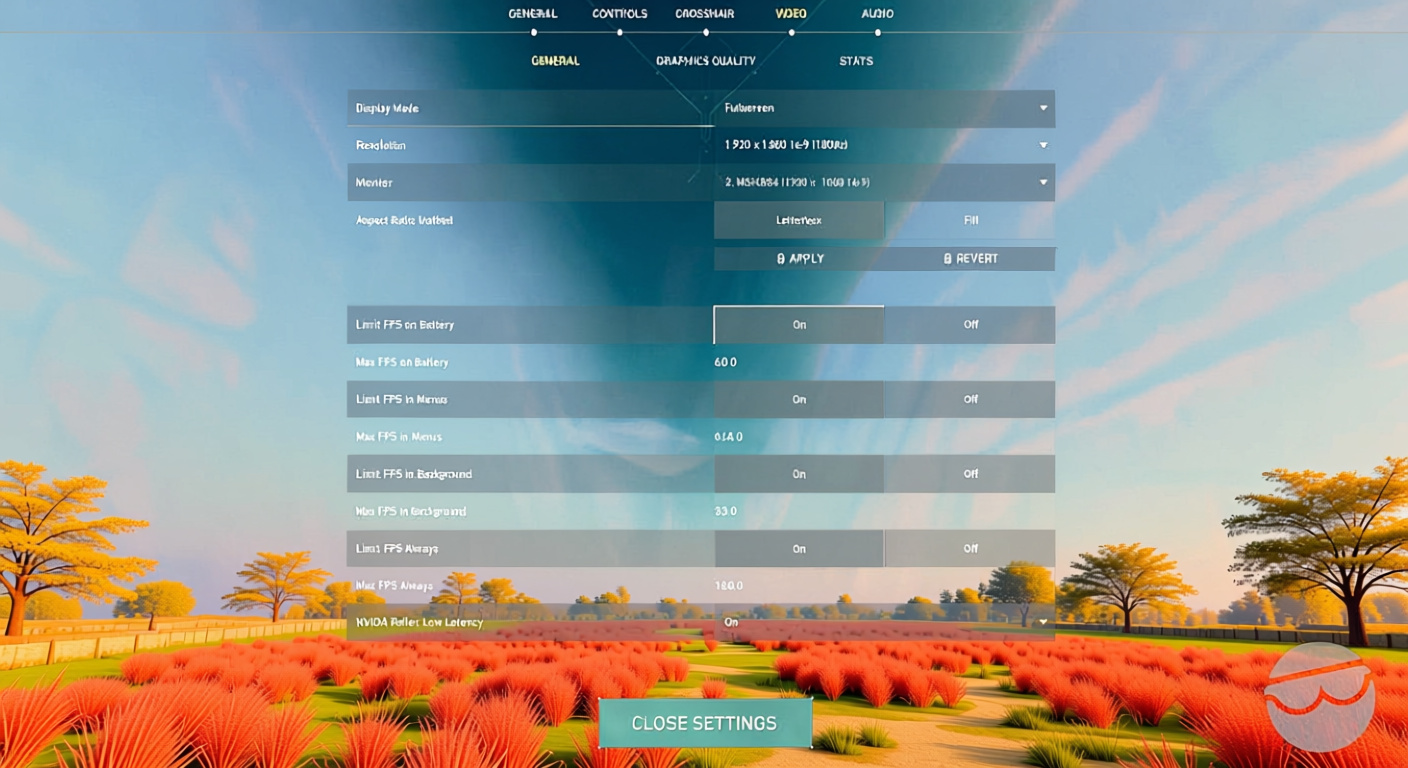
Screen setup makes or breaks your enemy spotting and snap reactions. Crank FPS sky-high, but keep things sharp enough to pick out heads amid smoke and frenzy. Fullscreen locks in the win – windowed modes drag with extra lag. I stick to windowed fullscreen just for streaming sessions with multiple screens and OBS fired up, but raw comp play demands straight fullscreen. Pros overwhelmingly run 1920×1080 (68% of the field), even if a few tinker with 1400×1050 stretched. Real 4:3 stretched hangs on in corners, but native res usually edges it out unless you’re chasing a specific look or squeezing frames by dropping lower. Refresh rates cut to the chase – 144Hz barely scrapes by for comp, but top dogs chase 240Hz (40% of pros) or 360Hz (41%). My 610Hz setup runs uncapped FPS, which leads straight to this: ditch any framerate cap unless tearing wrecks your screen or the system’s buckling. Surplus frames still shave off input delay. Here’s the full graphics teardown:
| Setting | Recommended Option(s) | Notes / Alternatives |
|---|---|---|
| Display Mode | Fullscreen | Cuts input lag dead |
| Resolution | 1920×1080 (68% pros); others: 1400×1050 | Stick to native or what clicks; 4:3 stretched stays rare |
| Refresh Rate | 144Hz+ (common: 240Hz, 360Hz) | Higher smooths everything out, trims latency |
| Max FPS | Uncapped or match monitor’s Hz | Cap it only for tearing or crashes |
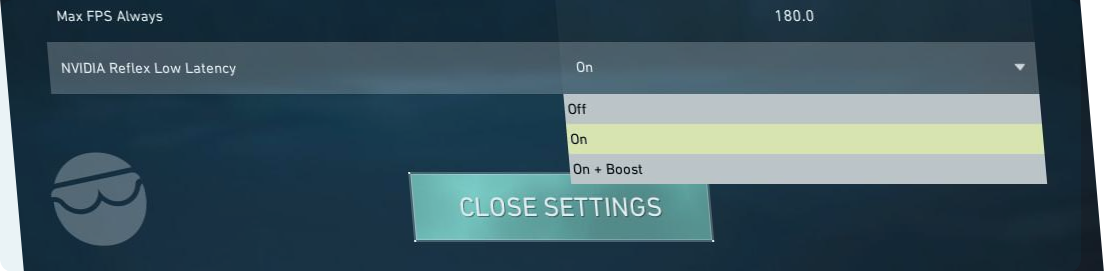
| NVIDIA Reflex Low Latency | On + Boost (NVIDIA only) | Slashes system delay |
| Multithreaded Rendering | On | Spreads CPU load better |
| Material/Texture/Detail Quality | Low; Texture Medium on high-end GPUs | Low pumps FPS, Medium splits the difference |
| UI Quality | Low – Medium | Barely touches performance |
| V-Sync | Off | Flip it on just for brutal tearing |
| Vignette | Off | Keeps sightlines clear |
| Anti-Aliasing | MSAA 2x or Off | MSAA 2x sharpens edges, Off maxes speed |
| Anisotropic Filtering | 2x – 4x (up to 8x on strong GPU) | Tiny clarity bump |
| Improve Clarity | On (if FPS allows), otherwise Off | Give it a spin both ways |
| Experimental Sharpening | On (optional; test on your rig) | Beta quirk – play around |
| Bloom | Off or On (purely cosmetic) | Bloom On jazzes up skins |
| Distortion/Cast Shadows | Off | Cast Shadows On spots enemy outlines sometimes |
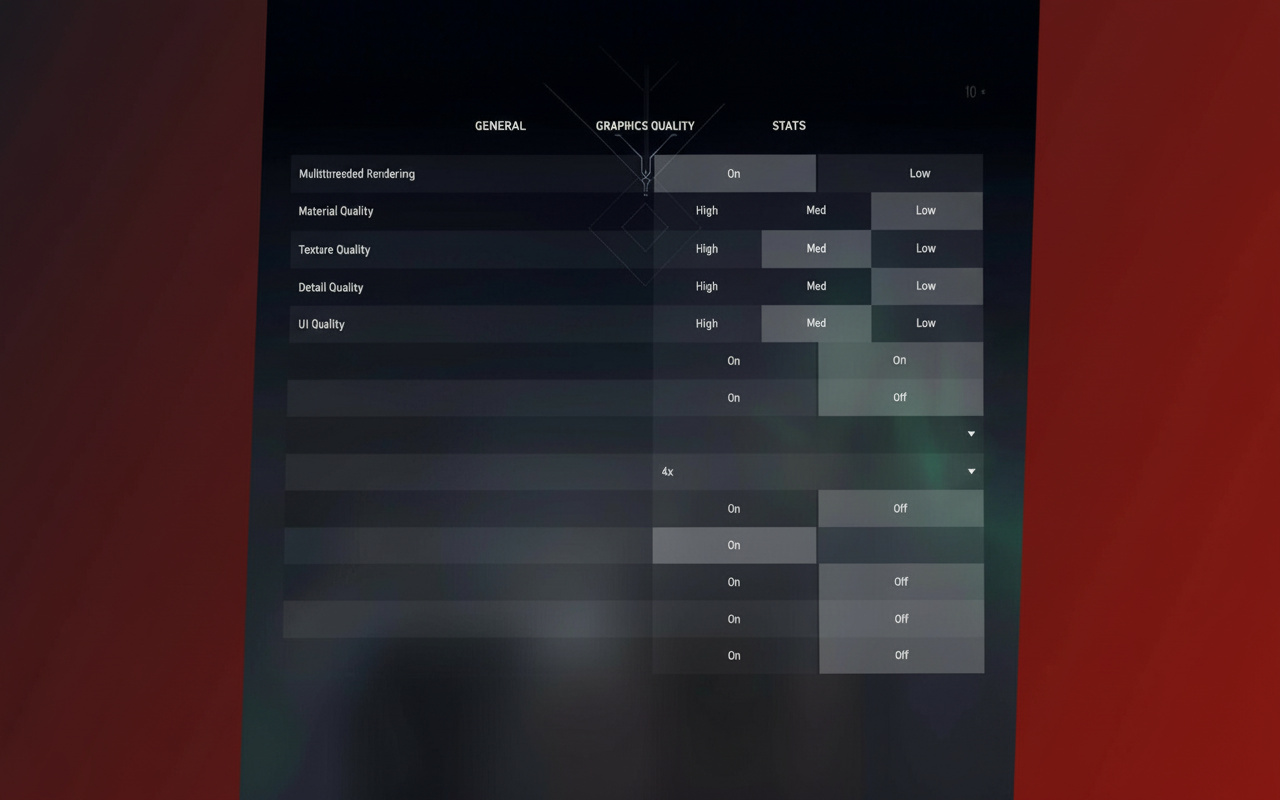
The tricky bits: Improve Clarity and Experimental Sharpening punch up details, but they eat frames on weaker hardware. I run Experimental Sharpening full-time – the game snaps into focus, thanks to Riot slipping it into patch 1.10 by mistake and keeping it beta after the outcry. Dial them in on your setup. Bloom? Total eye candy call. I flip it on for better skin glow, but kill it if you’re all-in on edge. Cast Shadows calls for a double-take – off by default to save power, but it flags enemy shapes in Viper’s tox or other fogged spots. Up to you.
Power User Tweaks Beyond In-Game Settings
- Windows Power Plan: Hit High Performance (or Ultimate if it’s there). Stops CPU dips in tight spots.
- NVIDIA Control Panel: Dive into 3D tweaks. Nudge digital vibrance up a touch – enemy edges jump out from the mess.
- Task Manager Priority: Bump valorant.exe and its helpers to High. Hands the game first dibs on CPU.
- Windows Graphics Settings: Flip on Hardware-accelerated GPU scheduling. Newer cards eat this for steadier high-frame runs.
Mouse, Sensitivity, and Precision Controls

Sensitivity builds your aiming bedrock. Nail repeatability – same flick, same muscle twitch, every pop.
DPI’s overrated. Pros glue to 400 or 800; anything past 1,600 screams amateur hour. Real sauce? DPI times in-game sens for eDPI.
Competitive breakdowns:
- In-game sens sweet spot: 0.3 – 0.5 (pros hover 0.32 – 0.40)
- eDPI zones: 150 – 400 rules the pros
- Key stats: Median eDPI at 240, average 267, some pools hit 320
- Real-world spin: 45cm for a full 360 on average
Scoped sens holds at 1.0 for the pack (keeps ADS hip-fire synced), but averages dip to 0.97. A few drop it lower for sniper lockdown.
Polling rate hits 1000Hz – no exceptions in comp land.
Raw Input Buffer flips on for high DPI or over-1000Hz polling. Skips Windows accel nonsense entirely.
Testing Your Perfect Sensitivity
Blind copying flops hard. Hit the Range:
- Lock on a mid-range bot
- Follow its side shuffles
- Crosshair lagging? Sens too low – bump it
- Twitching past? Too high – dial back
Kick off at eDPI 280. Tweak till tracking flows and 180s feel right.
Pro move: Flip on Movement Error Graph. Pinpoints if misses stem from sloppy moves or aim alone – gold for fixes.
Crosshair Settings and Import Codes
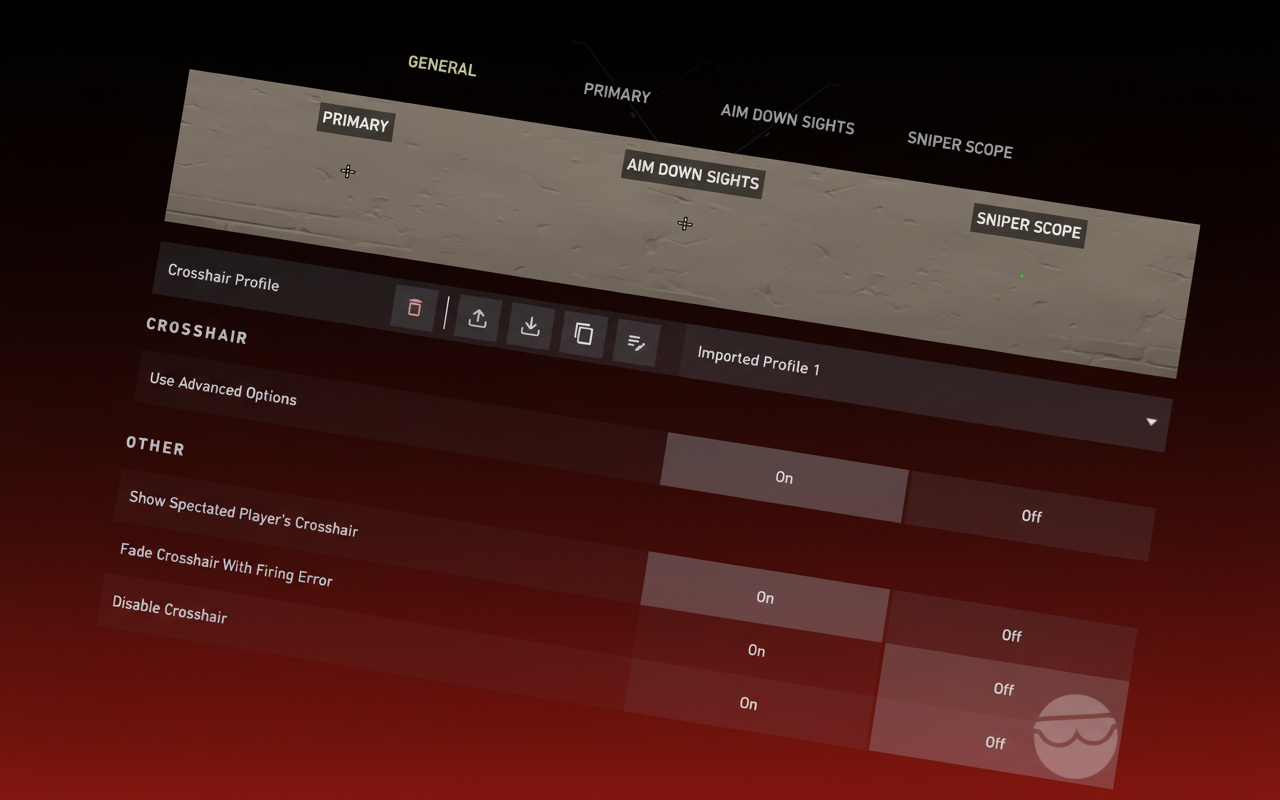
Crosshair demands standout punch against any backdrop – ditch flashy for pure sight. Pros lean static, bright hues, slim or outline-free, no motion or fire wobble, mid lengths and gaps, outers off.
Paste these as launchpads, then tweak to fit:
| Description | Import Code | Pro/Example |
|---|---|---|
| Dot Outline | 0;P;o;1;d;1;0t;4;0l;1;0v;1;0o;0;0a;1;0f;0;1b;0 | YouTube Guide |
| Plus (+) | 0;P;h;0;0l;4;0v;4;0o;0;0a;1;0f;0;1b;0 | YouTube Guide |
| Box Outline | 0;P;t;2;o;1;d;1;0b;0;1b;0 | YouTube Guide |
| Zekken (pro) | 0;P;c;8;b;1;t;2;o;1;z;2;a;1;0t;2;0l;2;0v;2;0o;0;0a;1;0s;1;0e;1;1t;2;1l;2;1v;2;1o;10;1a;0.35;1s;1;1e;1;u;FFFFFF;d;1;h;1;0g;0;1g;0;0f;0;1f;1;0m;0;1m;1;0b;1;1b;0;m;0 | Pro |
| Cryocells (pro) | 0;P;h;0;0l;4;0o;0;0a;1;0f;0;1b;0 | Pro |
| Aspas (pro) | 0;P;c;8;b;1;t;1;o;0.5;z;2;a;1;0t;2;0l;3;0v;3;0o;2;0a;1;0s;1;0e;1;1t;2;1l;2;1v;2;1o;10;1a;0.35;1s;1;1e;1;u;FF0000;d;0;h;0;0g;0;1g;0;0f;0;1f;1;0m;0;1m;1;0b;1;1b;0;m;0 | Pro |
| cNed (pro) | 0;s;1;P;h;0;f;0;0l;5;0o;0;0a;1;0f;0;1b;0;S;s;0.8 | Pro |
| Mimi (pro) | 0;P;c;5;o;0.25;0l;4;0o;2;0a;1;0f;0;1b;0 | Pro |
| General Alternative | 0;s;1;P;c;5;h;0;m;1;0l;4;0o;2;0a;1;0f;0;1b;0 | General usage |


Color plays mind games. Yellow rules pro rosters – pops against map clutter. Red might speed reactions by screaming “target.” Purple? Some swear it cuts through the noise.
Start small dot or slim plus, yellow or cyan, light outline. Mess with width and span till it sticks without hunting in scraps.
Minimap and HUD Settings
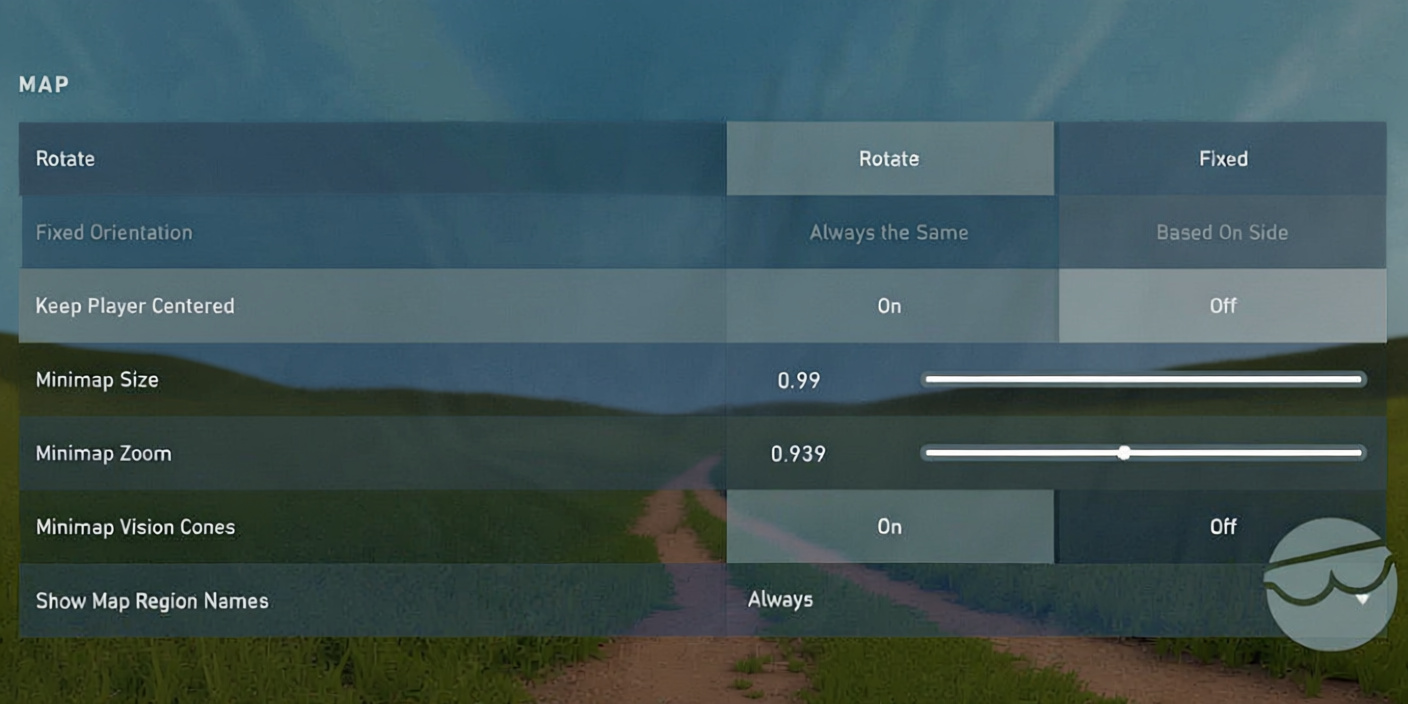
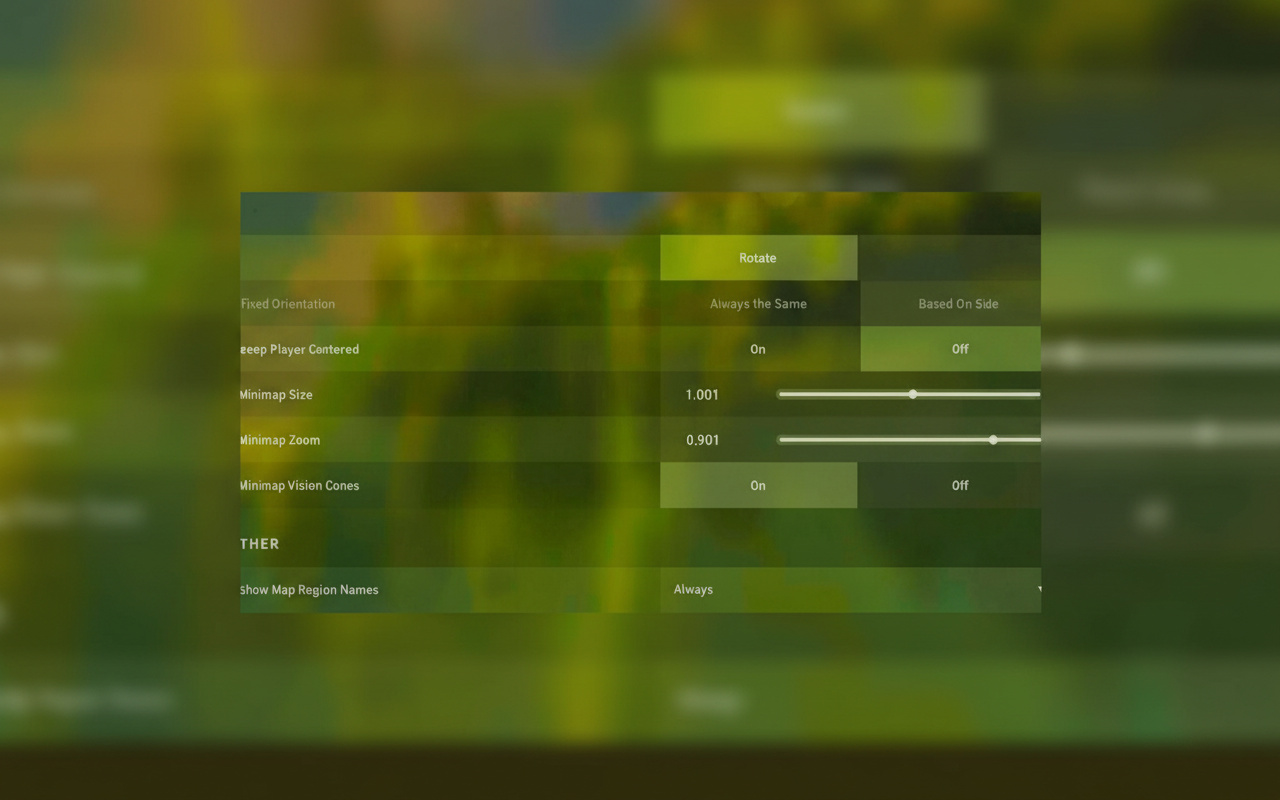
Map smarts clinch rounds. Minimap tweaks shape your rotates and reads.
| Option | Recommended Value | Notes |
|---|---|---|
| Rotate | On or Fixed (fixed for beginners) | Fixed stays steady; Rotate matches your view |
| Fixed Orientation | Based on Side | Locks attack/defense directions |
| Keep Player Centered | Off (most guides); On (some pros) | Off reveals more ground |
| Minimap Size | 1.0 – 1.25 | 1.1 – 1.25 hits sweet |
| Minimap Zoom | 0.9 – 1.0 | Steer clear of tight zooms |
| Minimap Vision Cones | On | Flags watch angles |
| Show Region Names | On / Always | Boosts calls and chatter |
Keep Player Centered sparks fights – Off floods the view with terrain (my pick for rotates), but pros split on On for fixed bearings. I kill it; full map rules.
Show Corpses: Off – clears junk fast. Ragdolls clog lines and fake motion in your side-eye.
Show Blood: On – nails shot feedback. Splatter tracks your spray damage on the fly.
Fire up Client FPS and Network RTT displays in games. Live stats snag drops or lag spikes – text and graph for quick checks.
Audio Settings for Enemy Detection
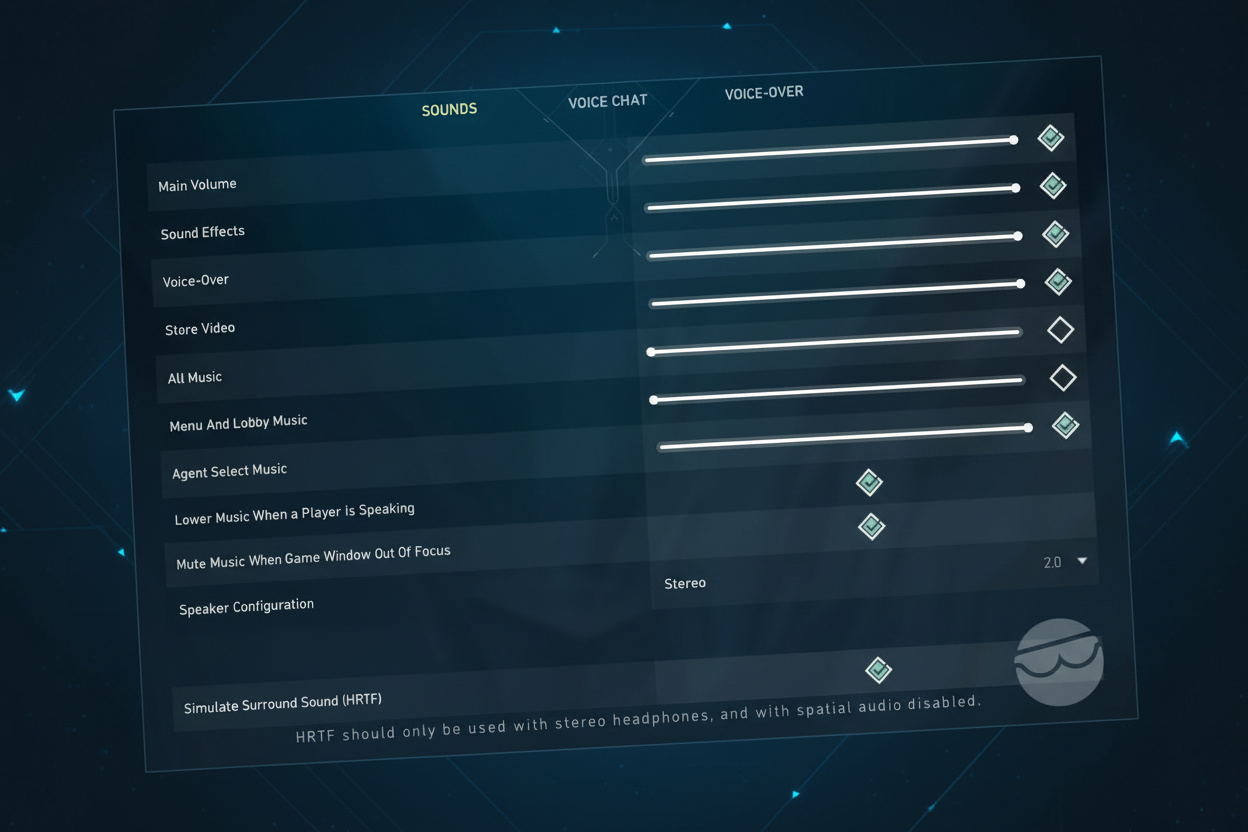
Sound direction seals clutches. HRTF turns Valorant’s audio into pinpoint intel.
Core audio lineup:
- Speaker Configuration: Stereo – skip surround/3D clashes
- HRTF: On – nails footstep, drop, reload spots
- SFX Volume: High/100% – max out steps and kits
- Voice Volume: Dialed down – comms without overload
- Music Volume: Off/0% – zero noise for lock-in
- Agent Flavor/Voiceover: Off for edge (on for vibe if you want)
Kill headset or OS surround if HRTF’s live. They tangle – HRTF owns the space; extras fuzz directions.
Pro hack: Hit the loopback test for mic check and levels. Grab real input/output gear over defaults – locks in your hardware.
Footstep reads have clutched endless rounds for me. Pinning a push to left or right cubby from sound alone? Total edge.
Keybinds and Controls (PC and Console)
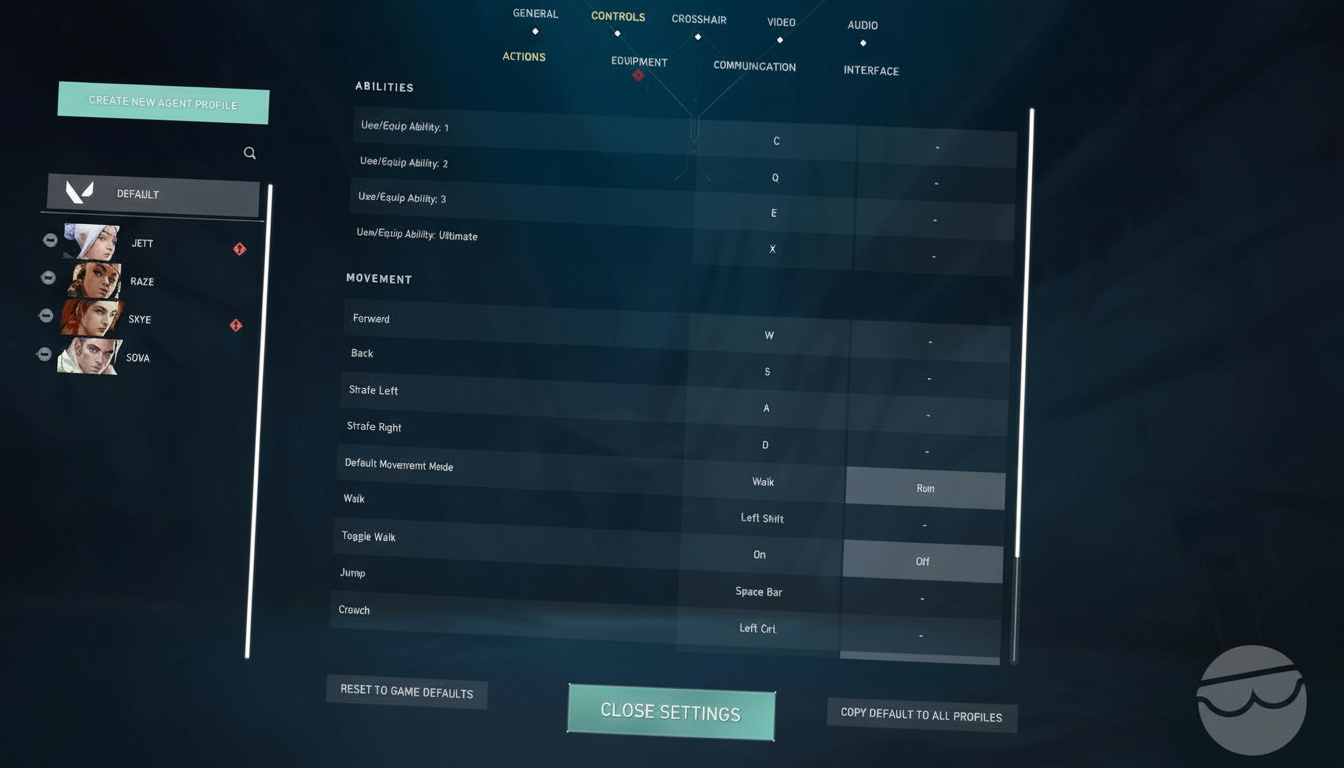
Speed and reach rule binds. Philosophy: utilities on quick keys (mouse sides shine), guns on numbers, interacts near WASD.
PC Keybinding Options
Movement:
- Forward: W
- Back: S
- Strafe Left: A
- Strafe Right: D
- Walk: Left Shift (toggle optional)
- Jump: Space or Mouse Wheel Down
- Crouch: Left Ctrl or C
Abilities:
- Ability 1: E or C
- Ability 2: Q or Mouse Button 4
- Ability 3: C, Mouse Button 5, or E
- Ultimate: X or F
Weapons/Equipment:
- Equip Primary: 1
- Equip Secondary: 2
- Equip Melee: 3, F, or Q
- Equip Spike: 4
- Next/Prev Weapon: Mouse Wheel Up/Down
- Drop Item: G
Interaction/Comms:
- Use/Object Interact: F/E
- Plant/Defuse Spike: 4/E/F
- Inspect: Y
- Show Teammate Loadouts: Left Alt
- Scoreboard: Tab (Hold)
- Open Map: M (toggle), Caps Lock (hold)
- Combat Report: N/H
- Ping/Comm Wheel: Z or Mouse Button 3
Comp folks slap abilities on mouse sides – shaves seconds in gun duels. Mouse Button 4 handles my second kit; that edge flips fights.
Auto Equip Prioritized in gear stops knife pulls in clutches – turn it on, nix auto-melee.
Console Controller Configuration
- Walk While in Focus: Off
- Vibration: Off
- Left/Right Trigger Deadzone: 0.01
- Fire: R2/RT
- Focus/Sniper Scope: L2 (Hold)/LT (Hold)
- Ability 1: L1/LB
- Ability 2: R1/RB
- Ability 3: R3/RS
- Ultimate: L1+R1/LB+RB
- Equip Secondary: △/Y
- Reload/Use: □/X
- Jump: ×/A
- Crouch (Toggle): ○/B
- Ping: D-Pad Up
Console crews gain from no vibration – cuts shake in transfers. 0.01 deadzone fights drift but keeps snap.
PC Requirements and Recommended Specs
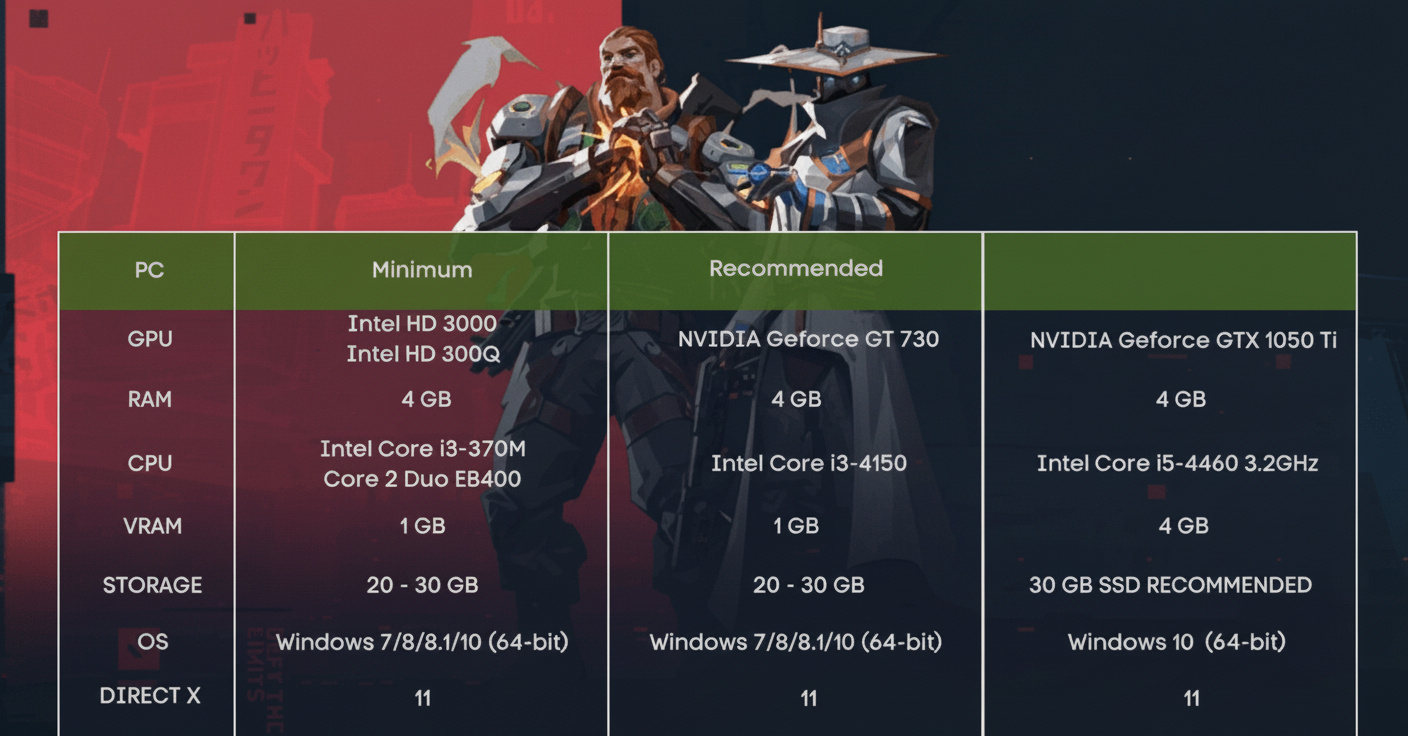
Steady frames beat peaks. Drops mid-push tank rounds; locked FPS holds your groove.
| Component | Minimum (30 FPS) | Recommended (60 FPS) |
|---|---|---|
| CPU | Intel Core 2 Duo E8400 / AMD Athlon 200GE | Intel i3-4150 / AMD Ryzen 3 1200 |
| GPU | Intel HD 4000 / AMD Radeon R5 200 | GeForce GT 730 / AMD Radeon R7 240 |
| RAM | 4 GB | 4 GB |
| OS | Windows 10 (Build 17134+)/11 64-bit | Windows 10/11 64-bit |
Straight up: 30 FPS kills comp dead; 60 FPS leaves you behind. Now it’s 120+ FPS floor, best at 150 – 240 if gear matches. Lag drop from 60 to 144 hits hard.
Monitor jumps past 240Hz fade unless you’re top-tier grinding. 60 to 144? Night and day. 144 to 240? Solid step. 240 to 360+? Barely moves the needle for regular folks.
Pro Player Settings Patterns
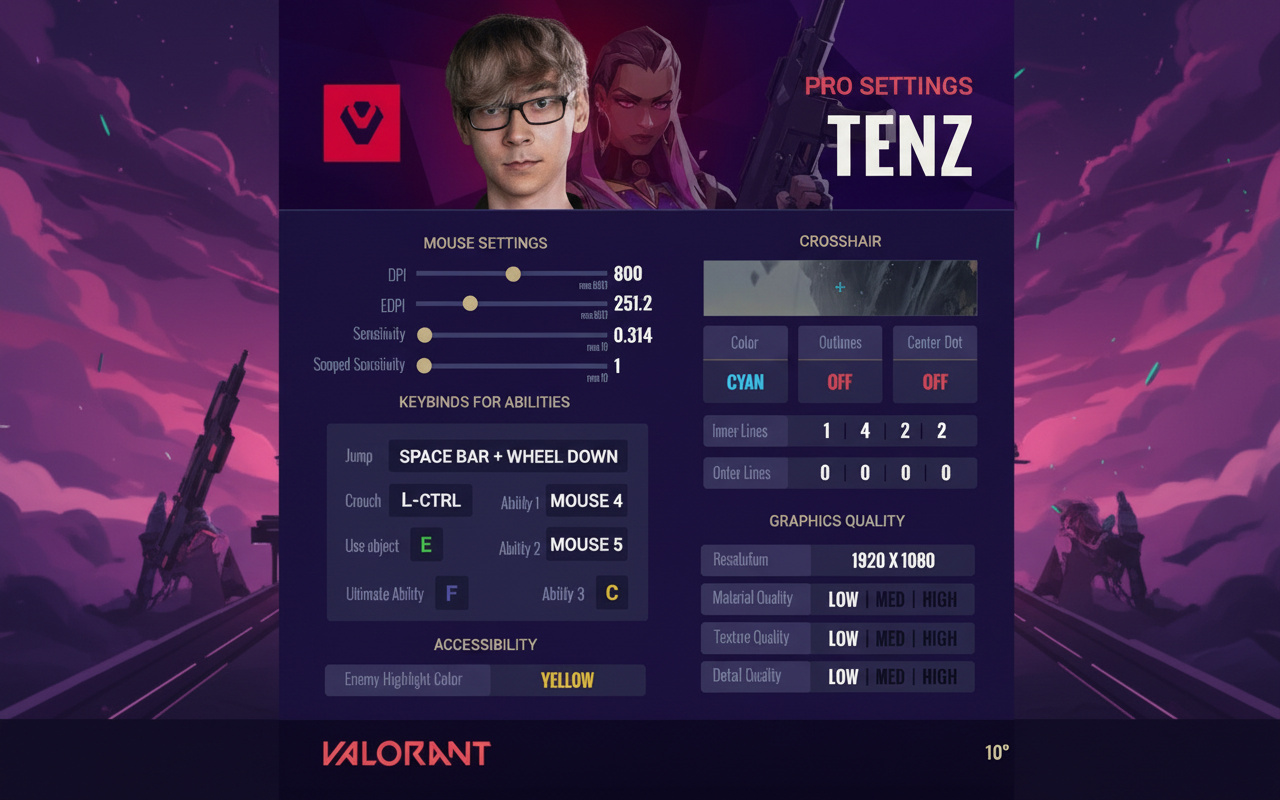
Hundreds of pro configs boil down to patterns – battle-tested, not luck:
Graphics: Low on materials/details/textures for FPS spikes and clean enemy pops
Resolution: 1920×1080 owns it (68%), 4:3 tweaks trail
Monitor Refresh Rates: 240Hz and 360Hz dead even (40% vs 41%)
Mouse: DPI at 400 or 800; low sens sets the bar
Scoped Sensitivity: 1.0 everywhere – syncs hip to ADS
Polling Rate: 1000Hz no debate
Crosshair: Static, bold colors, light or no lines, zero error modes
Keybinds: Short reaches; mouse sides for kits
Audio: HRTF on, tunes off, SFX cranked, no surround mess
Build from these. Tweak for feel – a setup you own beats pro copy you fumble.
Advanced Optimization and Unique Tips
- Solo test Improve Clarity and Experimental Sharpening. Keep if frames hold; they sharpen on beasts, drag on basics.
- Cast Shadows picks spots: Off saves juice, but on catches shapes in Viper fog or haze. Map-comp switch.
- Movement Error Graph splits aim woes. Flags move slips vs pure shots – zeros in practice.
- Nudge digital vibrance in NVIDIA (60 – 70% ish). Models leap from textures – heads stand out on peeks.
- Streamers: Hide Riot ID, generic non-party tags. No mid-fight name distractions.
- Process priority and GPU scheduling in Windows steadies frames. Blocks background theft in heats.
- Network buffering minimum sans packet woes. Else, it piles delay.
- Feel over pro clones. Tweaks unlock plays – they don’t make them. Nail natural, grind to instinct.
11 Essential Gameplay and Movement Tips
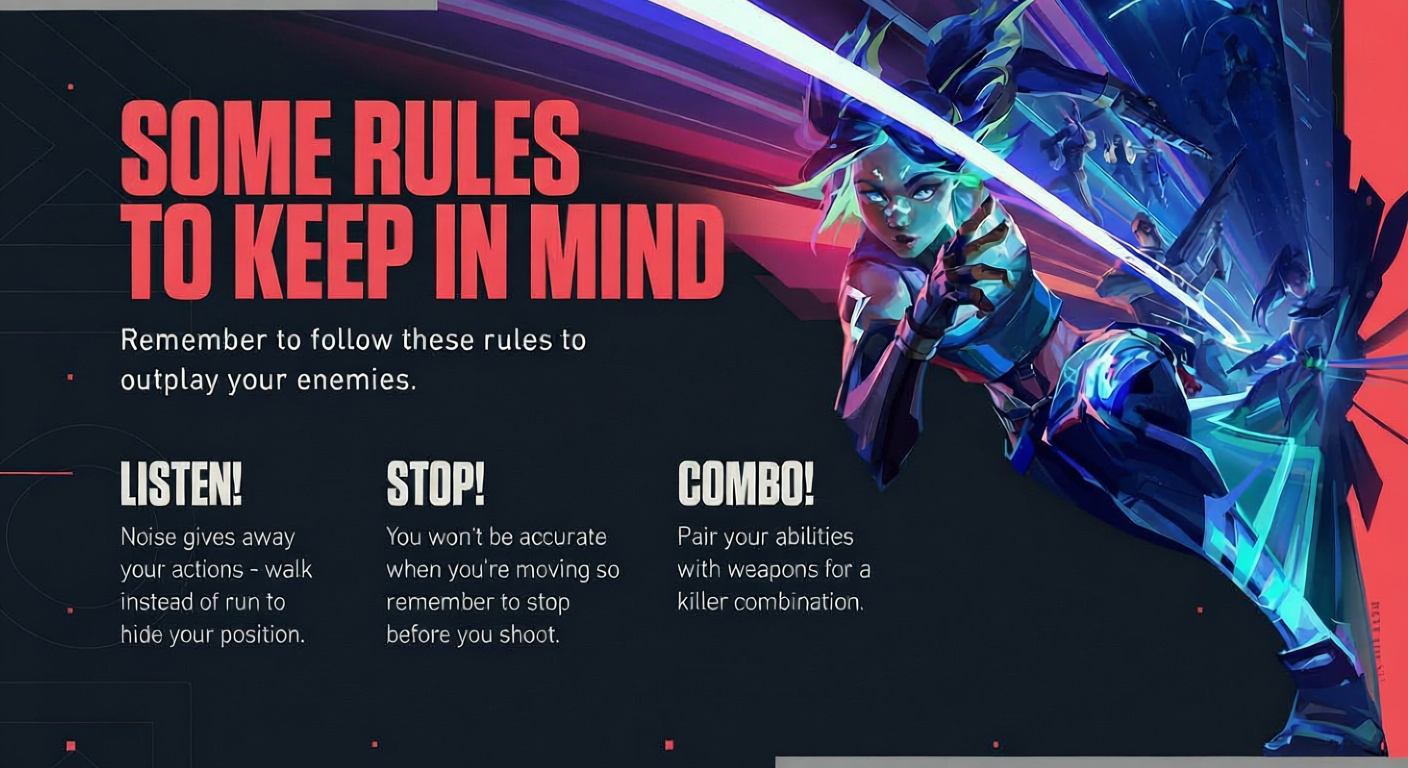
Settings idle without in-game smarts:
- Bait shots with timing. Shift when they twitch – misses open your counter. Read the beat.
- Pre-aim trumps raw skill. Hover crosshair off walls or holds – room to react. Dead-on corners? No wiggle space.
- Fit aim to your groove. Watch pros matching your style, not forcing odd ones. Flicks or tracks – pick your lane.
- Drill calls and light IGL. Sync utils and pushes outgun solos. Quick shouts snowball info.
- Pick agents to gap enemy kits. No flashes? Own bold lines. Smoke dry? Plants expose. Hit comp holes hard.
- Back up for angle wins. One sight at a time – avoids multi-threats. Space buys seconds.
- Lurk by rotation reads. Smart lurking times enemy shifts, then strikes – not blind roams.
- Def push when comp fits. Holding passive flops sometimes; press with team edges over cookie setups.
- Agents boost frags, not replace them. Kits amp your gun – pick to mesh aim, not swap skill.
- Apex crouch-jump for odd spots or quiet lands. Crouch peak for lift; drop crouch mutes falls.
- Chase fun – it fuels gains. Hate-filled grinds stall. Hook what clicks; motivation ramps progress.
All the goods sit here. Grab codes, fit to your box, Range test, then queue comp. Tweaks set the stage – grind and sense stack the wins.